The Data and Technology Services team is using GitHub and Zenhub for agile project management. This is an overview of our process.
Create a GitHub account if you don't have one already.
Have someone on the DTS team add you to the organization and the team as a Maintainer.
Add the to your browser.
Log into the using your normal GitHub credentials to activate your account.
The Zenhub board uses a -like format where issues are represented as cards and move across the board as they enter various stages of completion. Our workspace pipelines are:
New Issues - Awaiting triage by Level I Support or Product.
Icebox - Recorded and understood, but not committed to. Lack of evidence of overall value or applicability. We don't want to delete these and create a cycle of raising duplicate issues, so we keep them in our icebox with just enough information attached that we can pick it up sometime in the future — if and when we choose to do so.
Needs Scoping - Potential projects or features that require clarification or exploration before presenting to builders for estimation and prioritizing.
Tracking our work in issues not only helps us stay organized, it gives us data on where we're spending our time. To create an issue, click the green "New issue" button in the upper right corner of the or our .
You will see a list of our custom issue templates. These are handy for creating bug reports, meetings, etc. with boilerplate information and structure.
Issue titles should begin with a verb* and summarize the work to be completed. This convention improves data readability and helps keep our tasks action-oriented and unambiguous. Since you'll be using Product: and Type: labels, you don't need to spell out application names or issue types.
*Consider Update, Implement, Add, Remove, Review, Discuss, Troubleshoot...
You can apply labels by clicking the "Labels" heading in an issue's right-hand sidebar and beginning to type the label name.
You can also .
Accurate labeling is necessary for several reasons:
Labels allow us to view related issues across the Zenhub pipelines. For example, during Apps Team Sprint Planning, we filter down to Service: Apps and during our periodic meetings with AMD we use the Workgroup: AMD label to look at all the work — across teams, of all sizes — that we're doing for them.
Labels are also used to populate .
Finally, labels are critical to the
— the customer we're serving; Workgroup: DTS for internal work and Workgroup: TPW for department-wide work. Every issue should have one, and only one, Workgroup: label.
— The DTS service team who will be doing the work. If there are two teams working on the same thing, copy the issue so there's one for each team. Every issue should have one, and only one, Service:
A DTS team or individual product manager may find these additional label categories helpful
— The effect of a bug, infrastructure failure, etc.
Impact: 1-Severe — Severely impacts TPW service delivery
Impact: 2-Major
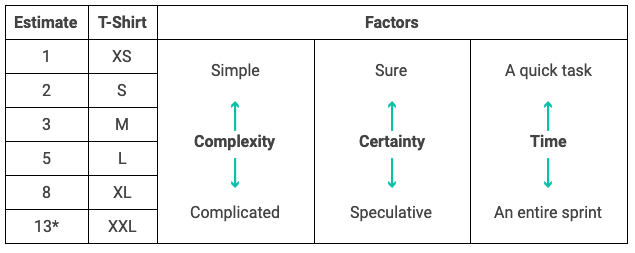
Estimates are how we track the level of effort of issues. Every issue should have an estimate once it is pulled on deck or into progress, and estimates can be adjusted as needed. Check estimates for accuracy whenever you close an issue. Use 0 estimates for duplicates and other issues we don't work on.
Like labels, estimates are required because they are a critical component of the we use to track, analyze, and improve our work. Estimates are also useful for
Sprint planning — to see when a person or team has too many issues (or too few!) issues assigned to them
Stakeholder discussions when prioritizing features — being able to show stakeholders easily that we can accomplish, say, three small tasks, two medium, or one large
— i.e. predicting the likelihood we can complete a project by a given date
about the hows and whys of estimates with ZenHub.
An issue should be assigned to the person/people who will tackle it. This enables team members to filter down to issues they are responsible for easily.
Epics are a powerful feature that Zenhub adds to Github. They allow you to group related tasks and easily track them from one place. . Here from another City of Austin project.
For ongoing tasks such as a recurring meeting, it may help to create an epic and put the individual instances of the tasks inside it. of that type of usage for a task performed for a customer regularly.
Epics do not need estimates assigned to them manually. Instead, the effort is represented by the total of all the story points in the epic's issues. That said, you can add estimates to the epic issue to represent the effort used to managing the sub tasks, i.e. meetings with stakeholders as the work progresses.
Ultimately, epics can group whatever makes sense for you and your collaborators. Some people prefer . That's fine as long as the issue doesn't require more effort than we can represent in our for a single issue.
Github recently introduced , and on top of them. The DTS Product team hasn't yet decided if/how we will modify our workflow to incorporate these new features. For now, we're continuing to use epics as we always have.
Here are some additional guides for some of our most relied-upon Zenhub functionality:
"Use multi-action to make bulk Issue updates" on
The are super-solid, and we encourage you to peruse them at your leisure. Remember that some functionality—renaming and reordering pipelines themselves, for example—will affect the workspace for the whole team. We're always looking for ways to improve our process, so if you come across an approach or functionality you think is promising, add it to the agenda for our weekly Product Sync or share it in the #atd-product Slack channel!
Backlog - Issues that are ready to be tackled by the team when the time comes. This pipeline is prioritized: the higher an issue is on this list, the higher the priority.
On Deck - Slated for work in the current sprint. During Sprint Planning, we pull all issues that we intend to work on during the sprint into On Deck.
Blocked - Issues that cannot be completed — often waiting on CTM or user feedback.
In Progress - This one is self-explanatory. Each Issue in this pipeline should have an assigned owner who is responsible for its completion.
Ongoing - Continually supported products and activities.
Review/QA - Proposed as complete but awaiting approval — code review and/or acceptance testing — before closure.
Ready to Deploy - Code or configuration that is ready to be deployed to production.
Closed - Done! 🙌
Type — The type of request or task. Every issue should have one, and only one, Type: label
Project and/or Product labels, if applicable
Projects refer to a substantial scope of related work that will reach a state of relative completion, such as the AGOL Audit
Products are solutions that we continue to support over time, including all in-house applications, such as the Vision Zero Crash Data System
Often, a major feature or enhancement to an existing product will require enough resources and coordination that it qualifies as a project. , for example, was a major set of features and enhancements to AMD Data Tracker and the Finance and Inventory App, so it needed both Product and Project labels
Impact: 3-Minor — Deteriorates TPW service delivery
Impact: 4-None — Does not affect TPW service delivery
Need — To designate priority of a potential feature or enhancement
Impact: 1-Severe — Severely impacts TPW service delivery
Impact: 2-Major — Causes a major interruption of TPW service delivery
Impact: 3-Minor — Deteriorates TPW service delivery
Impact: 4-None — Does not affect TPW service delivery
Provider — The external team or vendor executing the issue
Add task order fields to "Funding" tab
AMD staff can't track all funding information
Publish new CCTV camera thumbnails
CCTV map issues
Replace Vision Zero Editor council district dataset
— or — Replace VZE council district dataset
Outdated council district AGOL resource in Vision Zero Editor